Create your own AI digital clone

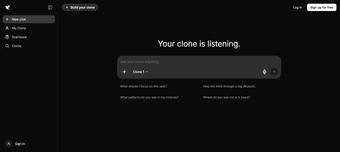
Zukudu is a free AI tool developed by Easwar Namboothiri. It is an AI-powered platform that lets you create a personalized digital clone capable of answering questions, offering insights, and reflecting your knowledge, experiences, and thinking style. This AI writing assistant software features a simple interface, secure account management, and easy-to-create clones.

Brainbook for smarter conversations

Unlike traditional virtual assistants, Zukudu clones are built to act as your digital twin. The AI is trained explicitly on your identity, unique data, past decisions, and communication style to think and respond exactly as you would, rather than acting as a generic assistant.

In addition, in this AI agent, you can build your clone by providing personal information and organizing it into a Brainbook, enabling more personalized and context-aware conversations. However, access to many advanced features requires creating an account and includes premium options.

Is Zukudu worth trying?

Zukudu delivers a unique AI experience by creating a personalized digital clone that reflects your knowledge, communication style, and decision-making. Its Brainbook and intuitive interface enable meaningful, context-aware interactions, making it useful for personal knowledge management. However, many advanced features require account registration and premium access.
  • Pros

    • Personalized AI digital clone
    • Reflects your communication style
    • Brainbook enables smarter responses
    • Simple and easy-to-use interface
  • Cons

    • Advanced features require an account
    • Premium access is behind a paywall
 0/1

App specs

  • Developer

  • License

    Free

  • Version

    1.0

  • Latest update

  • Platform

    Web Apps

  • OS

    Firefox

  • Language

    English

Program available in other languages


User reviews about Zukudu

Have you tried Zukudu? Be the first to leave your opinion!

Add review

Latest articles

Laws concerning the use of this software vary from country to country. We do not encourage or condone the use of this program if it is in violation of these laws.
Softonic

Is Zukudu safe?

100/100

Score result: Clean

This file passed a comprehensive security scan using VirusTotal technology. It is safe to download.

  • Virus free
  • Spyware free
  • Malware free
  • Verified by Security Partners

    VirusTotal logo

Scan Info

Last scan
Monday, August 17, 2026
Scan provider
VirusTotal

Softonic security commitment

Zukudu has been thoroughly scanned by our advanced security systems and verified by industry-leading partners. This file comes from the official developer and has passed all our security checks, showing no signs of viruses, malware, or spyware. For more information, visit our Security and Trust Center

Signed in to Softonic as